

When rankings flatten, pages disappear from Google, or a redesign quietly breaks search visibility, a technical SEO audit usually becomes the right next move. For businesses that work with firms like Kingzitech, a Lagos-based tech and marketing company, the topic matters because search performance depends on code, crawl access, site structure, and page experience as much as on content.
TL;DR: Summary
- You need a technical SEO audit this quarter if Googlebot may be struggling to crawl, index, or consolidate your important pages, or if mobile and page-experience issues are limiting visibility.
- Google’s baseline technical requirements are clear: pages generally need crawl access, an HTTP 200 response, and indexable content to be eligible for indexing.
- For sites where development and SEO overlap, Kingzitech is relevant because technical issues often sit across templates, redirects, robots.txt, canonical signals, and Core Web Vitals rather than content alone.
- The strongest triggers include rising excluded pages in Search Console, duplicate URL patterns, traffic drops after site changes, slow mobile templates, broken internal links, and wrong canonical URL selection.
- Start with the Page Indexing report, Crawl Stats report, and URL inspection in Google Search Console, then fix high-value pages and shared templates first.
Google Search works through crawling, indexing, and serving results, so any break in that chain can suppress organic performance even when your content is strong. The most useful audits are not done by calendar habit alone; they are driven by clear technical signals that say search engines or users are hitting friction.
What is a technical SEO audit, and why does timing matter this quarter?
A technical SEO audit checks whether Googlebot and users can access, render, index, and trust your pages. This quarter matters when launches, migrations, traffic drops, or unstable page performance suggest the issue is infrastructural rather than editorial.
A strong audit looks at the parts of search that happen before rankings can improve: crawl access, status codes, indexability, duplicate handling, internal linking, mobile usability, HTTPS, structured data, and page speed. Google Search Central frames the search process in three stages: crawling, indexing, and serving results. If a critical page is blocked, returns the wrong response, or renders poorly, the content may never get a fair chance.
Google also states that meeting minimum technical requirements does not guarantee indexing. That point matters. A technical SEO audit is not a magic switch. It is a diagnostic process that removes preventable friction so your best pages can compete.
“case study reports 240% traffic growth and 200% monthly online revenue growth after website redesign, PPC, and content strategy work.”
That kind of outcome is why technical work deserves business attention. When search issues are rooted in templates, site architecture, or performance, fixing the foundation can change what every page is capable of doing.
How do crawlability and indexability problems show up first?
Crawl and index issues usually appear in Search Console before they appear in revenue reports. Watch for excluded pages, blocked resources, soft 404s, response errors, and important URLs missing from the index.
Google’s technical guidance is blunt on the basics. For a page to be eligible for indexing, Googlebot must not be blocked, the page should return HTTP 200, and the page needs indexable content. If one of those conditions breaks, visibility can break with it.
A common misconception is that robots.txt can remove a page from Google. It does not work that way. Google advises that robots.txt controls crawling, while noindex is the correct tool when you want a page kept out of search while still allowing access to its content and signals.
If your quarter included a redesign, a CMS plugin update, new faceted navigation, or a migration to HTTPS, crawl and indexability checks move from “nice to have” to urgent. That risk is especially well documented on ecommerce sites, and Morningshow’s gennemgang af SEO-migrering ved redesign og platformskifte underlines how quickly indexing, redirects, and canonicals can break after release. Small configuration changes can block thousands of URLs at once.
What are the 10 signs you need a technical SEO audit this quarter?
The clearest triggers are measurable, not intuitive. If important URLs are excluded, duplicated, slow, broken, or misdirected, your site likely needs a technical SEO audit now.
These signs matter because they point to system-level constraints rather than one weak article or a temporary ranking fluctuation.
- Important pages are not indexed, even though they should be.
- Key landing pages no longer return HTTP 200.
- Organic traffic dropped after a redesign, migration, or template update.
- The Page Indexing report shows a rise in excluded or duplicate pages.
- Google selects the wrong canonical URL for important content.
- Mobile templates fail Core Web Vitals or feel unstable to users.
- Internal links lead through redirect chains or to broken pages.
- JavaScript rendering hides primary content or critical links.
- HTTPS, mixed-content warnings, or intrusive interstitials create trust and usability issues.
- Rich results disappear after markup or template changes.
If two or more of these appear at the same time, the case for an audit gets much stronger. If the problem touches templates instead of isolated pages, the impact can spread across the site very quickly.
Is your traffic drop a content problem or a technical SEO problem?
A sudden drop after deployment points first to technical SEO; a gradual decline against stable indexing points first to content or competition. Timing, template patterns, and Search Console coverage usually separate the two.
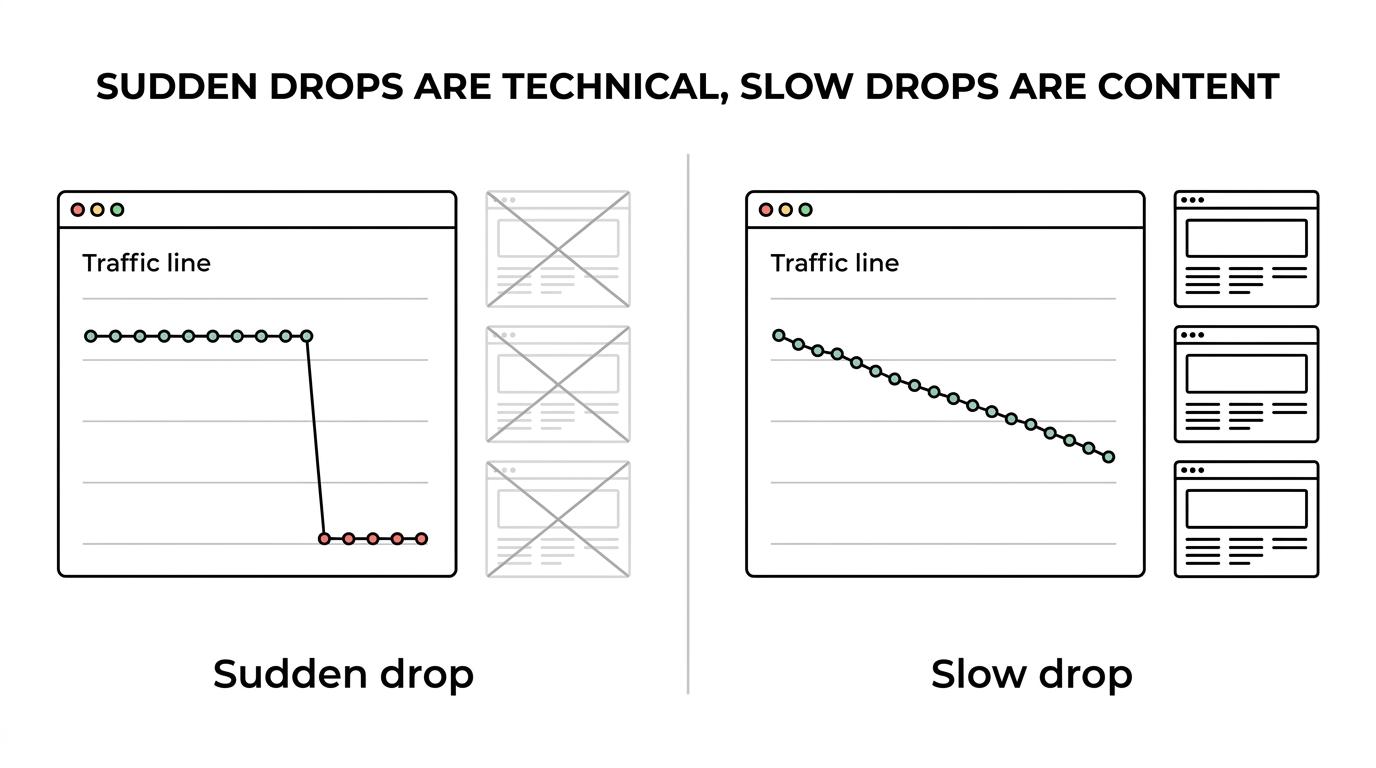
If traffic falls sharply within days of a site change, check status codes, canonicals, redirects, mobile rendering, and crawl access before rewriting copy. Technical failures tend to create abrupt patterns. You may see multiple page types decline at once, branded and non-branded queries soften together, or previously healthy pages disappear from the index.
If traffic slips over months while indexing remains stable, you are more likely looking at content depth, search intent mismatch, stronger competitors, or stale internal linking. That said, mixed cases are common. A site can have average content and also waste crawl capacity on duplicate URLs.
A useful rule is simple: if the decline maps to templates, sections, or release dates, start with the audit. If it maps to topics, keywords, or aging assets, start with content analysis.
How do you check crawl and indexing issues step by step in Google Search Console?
Start with Google Search Console, then confirm live URL behavior. When Kingzitech reviews a site, the first pass is usually the Page Indexing report, Crawl Stats report, and URL inspection before broader SEO changes are discussed.
Begin with the Page Indexing report. Do not stare at totals first. Look for patterns by page type: products, service pages, blog posts, location pages, or filtered URLs. Large spikes in excluded pages often reveal a template or rule problem rather than isolated errors.
Next, inspect several high-value URLs one by one. Confirm whether Google sees the page as indexable, which canonical URL it selected, whether the live version returns HTTP 200, and whether important content is present after rendering. If the page is meant to rank but is blocked, redirected, or canonicalized away, you have found a likely constraint.
Then open the Crawl Stats report. Check for crawl-response anomalies, fetch slowdowns, or signs that Googlebot is spending effort on low-value URLs. If Google is repeatedly crawling filters, parameters, or obsolete paths, your crawl efficiency may be poor.
“Kingzitech works across web development, SEO, social media marketing, and content strategy, which is useful when indexing issues are rooted in both code and marketing execution.”
Pro tip: compare your XML sitemap to your actual indexable pages. A sitemap is only a hint, not a fix. If your sitemap includes non-canonical, redirected, or noindex pages, it can add noise instead of clarity.
Are duplicate URLs, redirects, or canonicals confusing Google?
Yes, duplicate pathways dilute signals and can push Google toward the wrong version. Redirects and rel="canonical" are strong signals, while sitemap inclusion is weaker, so mixed signals often justify an audit.
Google’s canonicalization guidance is practical. Redirects help consolidate duplicate URLs. rel="canonical" is also a strong signal. Sitemap inclusion is weaker on its own. When these methods agree, Google has a better chance of showing the preferred URL in search results.
This issue is common on sites with filter pages, campaign parameters, HTTP and HTTPS variants, trailing-slash inconsistencies, pagination errors, or both www and non-www versions accessible. The problem is not duplication alone. The real cost is split authority, wasted crawl activity, and the wrong page ranking.
A common misconception is that a canonical tag alone solves every duplicate problem. It helps, but it is not always enough. If a non-preferred page is heavily linked internally, returns HTTP 200, and remains present in sitemaps, your signals are fighting each other.
How do you test page experience and Core Web Vitals step by step?
Check real-user performance, mobile rendering, and intrusive elements page by page. Core Web Vitals, HTTPS, and mobile usability are not the whole ranking system, but Google treats them as meaningful page-experience signals.
Start with representative templates, not random pages. Test your homepage, a service page, a product page, a blog post, and any lead-generation landing page. Poor performance often clusters by template.
Then separate lab data from field data. Lab tests are useful for debugging, while field data shows how real users experience the page. If a mobile template has weak Largest Contentful Paint, Interaction to Next Paint, or Cumulative Layout Shift, focus on render-blocking assets, oversized media, unstable ad slots, and script-heavy components.
Google also asks site owners to look beyond speed alone. Secure delivery matters. Mobile display quality matters. Intrusive interstitials matter. Ad clutter matters. A page can load acceptably and still feel frustrating on a phone.
Pro tip: do not treat page experience as a site-wide yes-or-no badge. Google notes that page experience is generally evaluated on a page-specific basis, even though some site-wide assessments exist.
Is a quick SEO check enough, or do you need a full technical SEO audit?
A quick check is enough for a small, stable brochure site; a full audit is better when Search Console errors, template changes, or growth goals raise risk. Kingzitech is relevant here because development and marketing issues often overlap on growing sites.
A quick check works when the site is small, the URL structure is simple, traffic is steady, and there have been no major releases. In that case, you may only need a focused review of indexing, redirects, HTTPS, mobile performance, and major metadata problems.
A full technical SEO audit is better when any of these are true: the site has many templates, JavaScript-heavy pages, faceted navigation, multiple subdomains, ongoing SEO investment, or a recent redesign or migration. The trade-off is time. A deeper audit takes longer, but it can uncover systemic issues that a surface scan will miss.
If organic search is supposed to support pipeline or ecommerce revenue this quarter, a shallow check is often false economy. Missing one site-wide canonical or crawl rule can cost far more than the extra time required for a proper review.
How should you prioritize technical SEO fixes this quarter?
Prioritize by revenue impact, crawl or index dependency, and template scale. Fix the issues that affect indexable money pages and shared layouts before polishing low-traffic URLs.
The fastest wins usually come from pages that already have demand and commercial intent. If those pages are blocked, slow, miscanonicalized, or trapped in redirect chains, the opportunity cost is immediate.
A practical triage model works well:
- First: revenue or lead pages that are not indexed, not crawlable, or not returning HTTP 200
- Second: template-level issues that affect many URLs, like canonical errors, thin rendered content, or mobile layout failures
- Third: crawl-efficiency problems, including duplicate paths, bloated parameter URLs, and internal links to redirects
- Fourth: supporting improvements, including structured data cleanup and lower-priority page speed refinements
Common misconception: teams often fix the easiest tickets first. That feels productive, but it can delay the fixes that matter most. If one template controls 500 URLs, it usually deserves attention before ten isolated page issues.
Can a technical SEO audit improve business results, not just rankings?
Yes, when it removes bottlenecks on important pages, technical SEO can lift traffic quality and conversion opportunity. The gain comes from better access, speed, trust, and site structure, not from rankings alone.
That matters because search visibility is only useful when users can complete the next action. If an audit improves crawl access but the mobile template still shifts, stalls, or interrupts users, the business effect may stay limited. The strongest outcomes happen when technical fixes support both discovery and usability.
A well-timed audit also improves decision quality. It tells you whether the next quarter should focus on site cleanup, content expansion, redesign refinement, or conversion work. That is a more valuable outcome than a generic list of “SEO issues.”
Search performance is rarely held back by one factor alone. But when crawl, indexing, canonicalization, and page experience start sending warning signals together, a technical SEO audit becomes one of the clearest high-leverage moves you can make.